If you've never done system design before, the vocabulary is the actual barrier. Not the concepts - the concepts are mostly common sense once you strip the jargon away. This post exists to strip the jargon away, one term at a time, in an order that actually builds on itself. By the end, you should be able to sit in a system design interview or a real architecture discussion and not feel lost the moment someone says "shard" or "idempotent."
Quick note before we start: system design is almost never about finding the "correct" answer. It's about trade-offs. Every term in this post exists because it solves one problem while creating another. As you read, don't just memorize the definition - ask "what does this cost me?" That question is 80% of what system design interviews are actually testing.
Part 1: Scalability - What happens when your app gets popular?
Imagine you built an app in a weekend. It runs on one server, and it works great for your 50 users. Then it gets featured somewhere and suddenly 50,000 people show up. Your one server can't keep up - it runs out of CPU, memory, or database connections, and requests start timing out. Scalability is the entire discipline of preparing for that moment before it happens.
Vertical Scaling - buy a bigger server
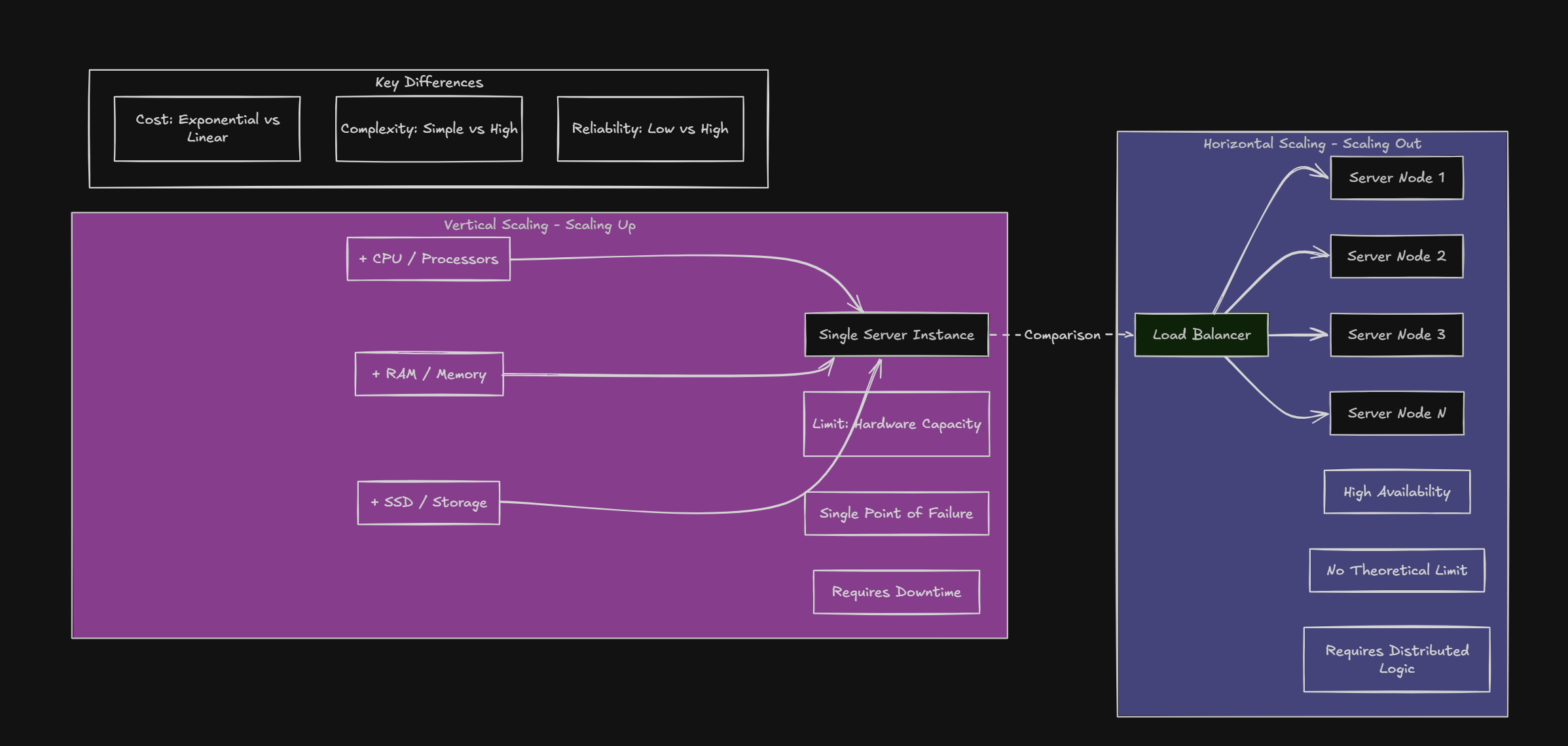
Vertical scaling means upgrading the single machine you already have - more RAM, a faster CPU, a bigger disk. It's the simplest possible fix: your code doesn't change, your architecture doesn't change, you just rent a bigger box.
- Pros: zero code changes, no added complexity, easy to reason about
- Cons: there's a physical ceiling (you can only make one machine so big), it costs more per unit of performance as you go up, and it's a single point of failure - if that one server dies, everything is down
Horizontal Scaling - buy more servers
Horizontal scaling means adding more machines that share the workload, instead of making one machine bigger. Instead of one server handling all 50,000 users, you might have ten servers each handling 5,000.
- Pros: virtually no ceiling - need more capacity, add more machines. No single point of failure, since one server dying doesn't take down the whole system
- Cons: real added complexity - now you need something to decide which server handles which request, and your servers can't rely on remembering things locally, because the next request from the same user might land on a completely different machine
Load Balancing - who answers the door?
Once you have multiple servers, something has to decide which server handles each incoming request. That something is a load balancer. It sits in front of your fleet of servers and spreads traffic across them, so no single server gets overwhelmed while others sit idle.
A load balancer can be as simple as round-robin ("send request 1 to server A, request 2 to server B, request 3 to server C, then back to A") or smarter - routing to whichever server currently has the least load, or the lowest response time.
Stateless Architecture - the server forgets you, on purpose
This is the rule that makes horizontal scaling actually work. A stateless server doesn't store any memory of you between requests - it doesn't matter which server handled your last request, because none of them are keeping personal notes about you in local memory. Anything that needs to persist (your login session, your shopping cart) gets stored somewhere shared - a database or a cache - that every server can read from.
"If your servers remember things locally, you can't horizontally scale, because the load balancer might send your next request to a server that has no idea who you are."
Auto-scaling - servers that appear and disappear on their own
Auto-scaling watches real traffic and adds or removes servers automatically. Traffic spikes at 8pm every night? Auto-scaling spins up extra servers right before the spike and shuts them down after, so you're not paying for ten servers around the clock just to handle a two-hour rush.
Part 2: Databases - where your data actually lives
Almost every interesting system design problem eventually becomes a database problem. Your app logic can be clever, but if your database can't keep up, nothing else matters. This section covers how data is structured, found quickly, and spread across machines.
SQL vs NoSQL
SQL databases (Postgres, MySQL) store data in rigid tables - rows and columns, like a spreadsheet - with relationships between tables enforced through foreign keys. A "users" table and an "orders" table are joined together whenever you need order history for a user.
NoSQL databases (MongoDB, DynamoDB) store data as flexible, often nested documents - closer to JSON than a spreadsheet row. Instead of joining a separate "orders" table, you might just embed a user's recent orders directly inside their user document.
Neither is "better" - SQL gives you strong consistency, complex queries, and enforced relationships, which is great for things like financial data. NoSQL gives you flexible schemas and generally scales horizontally more easily, which is great for things like activity feeds or logs where the shape of the data varies.
Indexing - a table of contents for your data
Without an index, finding a single row means scanning every single row in the table, one by one, until the database finds a match. On a table with a hundred rows that's instant. On a table with a hundred million rows, that same query can take seconds.
An index is a separate, pre-sorted data structure (usually a B-tree) that lets the database jump almost straight to the row it's looking for - the same way a book's index lets you jump to page 214 instead of reading every page to find "recursion."
The trade-off: indexes speed up reads but slow down writes slightly, because every time you insert or update a row, the index has to be updated too. That's why you index columns you search by often, not every column in the table.
Eventually, a single database server runs out of room - too much data, or too many requests, for one machine to handle. Sharding splits your database into multiple smaller databases, called shards, each living on a different server. Which shard a piece of data lives on is decided by a shard key - for example, users with IDs 1 to 1,000,000 go on Shard A, and 1,000,001 to 2,000,000 go on Shard B.
The tricky part of sharding is picking a good shard key. Pick badly, and you get a 'hot shard' - one server getting hammered with traffic while the others sit idle. Also, queries that need data from multiple shards (like 'show me the top 10 users across everyone') get significantly harder, since there's no longer one database to ask.
Replication - keeping copies of your database
Replication means keeping full copies of the same database on multiple servers. This does two things: protects you from data loss (if one server dies, you still have a copy), and speeds up reads (you can read from whichever replica is closest or least busy, instead of always hitting one server).
Usually there's one "primary" server that handles all writes, and multiple "replica" servers that stay in sync with it and handle reads. That's exactly what read replicas are, covered below.
Partitioning - splitting data by a logical rule
Partitioning splits data based on some rule that makes sense for your application - by country (India, US, EU), by date range (this year's orders vs last year's), or by a hashed key (userId % 4, so users are evenly spread across 4 buckets). Sharding is really just partitioning applied across separate physical servers instead of within a single database.
Database Normalization - organizing data to avoid contradictions
Normalization is about structuring relational data so the same fact isn't stored in multiple places, which would let those copies drift out of sync. If a user's address is stored in five different tables and they move, you now have to remember to update it in all five - miss one, and you have a contradiction sitting in your database.
- Unnormalized - messy, repeating, multi-valued data all crammed together
- 1NF (First Normal Form) - every cell holds a single value, no lists crammed into one field
- 2NF (Second Normal Form) - every non-key column depends on the entire key, not just part of it
- 3NF (Third Normal Form) - non-key columns depend only on the key, not on each other
In practice, most production systems are deliberately a bit denormalized in places - a small amount of duplicated data traded for faster reads, since joining five tables on every request gets expensive. Normalization is the default; denormalizing is a conscious performance trade-off you make later.
Read Replicas - extra copies dedicated to reading
Most real systems are read-heavy - think 90% reads (viewing a profile, browsing a feed) and 10% writes (posting something new). Read replicas are copies of the primary database that exist purely to serve read traffic, taking that load off the primary so it can focus on handling writes.
The catch is replication lag: it takes a small amount of time (usually milliseconds, sometimes longer under heavy load) for a write on the primary to propagate to the replicas. So if you write something and immediately read it back from a replica, you might momentarily see stale data. This is a very common real-world bug - 'I just updated my profile picture and it still shows the old one for a second.'
Transactions and ACID - guarantees for multi-step operations
A transaction bundles multiple database operations into one all-or-nothing unit. The classic example: transferring money between two bank accounts requires two operations - subtract from Account A, add to Account B. If the server crashes right after the subtraction but before the addition, you've just deleted money. Transactions prevent that.
- Atomicity - all operations in the transaction succeed together, or none of them happen at all
- Consistency - a transaction can only move the database from one valid state to another valid state
- Isolation - concurrent transactions don't see each other's half-finished work
- Durability - once a transaction is committed, it survives even if the server crashes a millisecond later
Part 3: Caching - the cheapest speed boost in system design
If there's one trick that gives you the most performance for the least effort, it's caching: keep a copy of frequently-requested data somewhere much faster than your primary database, so you're not re-fetching and re-computing the same thing over and over.
Redis - the go-to caching layer
Redis is an in-memory key-value store - meaning it lives in RAM rather than on disk, which makes it extremely fast (sub-millisecond reads are normal). It's commonly placed in front of a slower primary database as a caching layer: your app checks Redis first, and only falls back to the real database if the data isn't cached yet.
Cache-aside - the most common caching pattern
In cache-aside (sometimes called "lazy loading"), your application code checks the cache first. A cache hit means the data was there and gets returned immediately. A cache miss means it wasn't - so your app fetches it from the database, returns it, and also stores it in the cache for next time.
Cache Invalidation - the hardest problem in caching
The classic caching bug: a product's price changes from ₹1000 to ₹2000 in the database, but the old ₹1000 is still sitting in the cache, so users keep seeing the wrong price. This is cache invalidation - making sure stale data actually gets cleared out. There are three real strategies:
- Delete the key on update - when the price changes, delete the cached entry so the next read is forced to fetch fresh data
- Update the key directly on write - when the price changes, immediately write the new value into the cache too, so it's never stale
- Just wait for TTL - accept that the cache will be wrong for a short window, and let it naturally expire
"There are only two hard things in computer science: cache invalidation and naming things - and off-by-one errors."
TTL - Time To Live
TTL is how long a cached item is allowed to sit around before it automatically expires and gets thrown out, forcing the next request to fetch fresh data. It's the simplest safety net against stale data - even if you forget to explicitly invalidate a cache entry, it can't be wrong forever.
Part 4: Distributed Systems - when things can (and will) fail
A distributed system is just multiple machines working together to look like one coherent system from the outside. The moment you have more than one machine, you inherit a whole new category of problems: machines crash, networks drop packets, and messages arrive out of order or not at all. This section is about designing for that reality instead of pretending it won't happen.
CAP Theorem
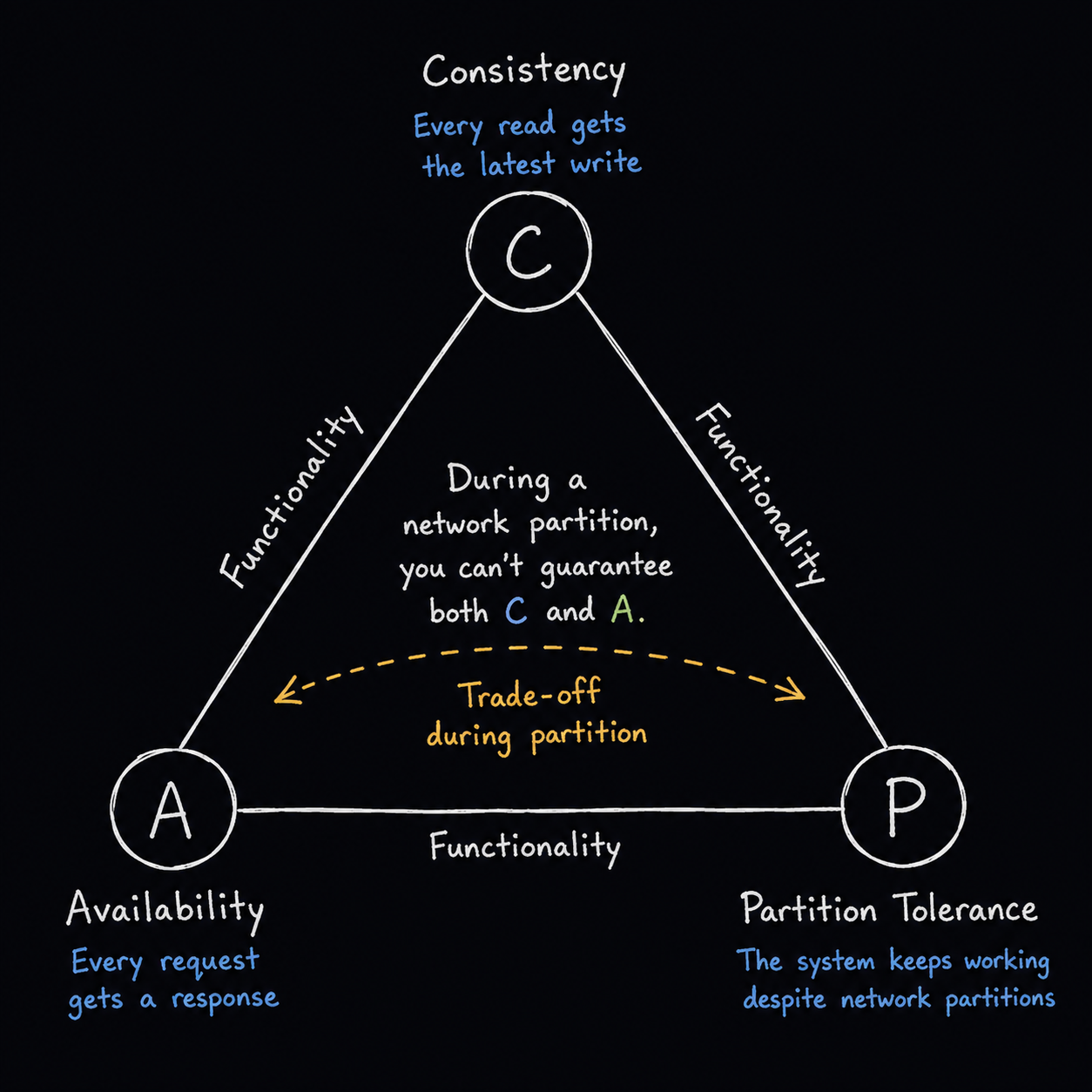
Picture your database replicated across two data centers, and the network connection between them suddenly drops - a network partition. Now each data center can't talk to the other. CAP theorem says that during a partition, you have to choose between Consistency (every server shows the exact same data, so some requests might get rejected until things resync) and Availability (every server keeps responding to every request, even if that means showing slightly different data). You can't have perfect versions of both at the same time during a partition - that's the whole theorem.
Eventual Consistency
A deliberate trade-off many distributed databases make: right after a write, different replicas might briefly disagree with each other. But given enough time with no new writes, all replicas will eventually converge to the same value. It's the price you pay for availability - the system keeps working during the disagreement instead of refusing requests until everyone agrees.
Fault Tolerance and High Availability
Fault tolerance is a system's ability to keep functioning correctly even when individual pieces of it fail - a server crashes, a disk dies, a network link drops. High availability is the outcome you actually care about as a user: the system stays reachable and responsive almost all the time, usually expressed as a percentage like 99.9% or 99.99% uptime (often called 'three nines' or 'four nines').
For context, 99.9% uptime allows about 8.7 hours of downtime a year. 99.99% allows only about 52 minutes a year. Each additional 9 gets exponentially harder - and more expensive - to achieve.
Idempotency - safe to repeat
An operation is idempotent if doing it once and doing it five times produce exactly the same end result. This matters enormously with retries: if a network request times out and the client retries it, and it turns out the first request actually did succeed on the server, you really don't want to charge the user's card five times just because the response got lost in transit.
A useful mental test: is HTTP DELETE /users/42 idempotent? Yes - deleting an already-deleted user still leaves you with a deleted user, same end state either way. Is POST /orders idempotent? No - calling it five times creates five separate orders, unless you explicitly add an idempotency key like in the example above.
Retry
When an operation fails, retry means trying it again instead of giving up immediately - since a huge number of failures are transient (a brief network blip, a server that was momentarily overloaded). Retries are usually spaced out with exponential backoff - wait 1 second, then 2, then 4, then 8 - so you're not hammering an already-struggling service with immediate repeated requests.
Circuit Breaker
A circuit breaker takes retries one step further. If a downstream service keeps failing over and over, the circuit breaker "trips" and stops calling that service entirely for a while, immediately returning an error (or a fallback) instead of waiting on a request that's very likely to fail anyway. This protects both your own system (no threads stuck waiting on a dead service) and the struggling downstream service (it gets breathing room to recover instead of being hit with more traffic while it's already down).
Part 5: Communication - how services talk to each other
Once your system is made of multiple services instead of one big app, you need a way for those services to actually exchange data. Different situations call for different communication patterns.
REST API
The standard request/response pattern over HTTP - a client sends a request (GET /users/42) and waits for a response. It's simple, human-readable, and works everywhere, which is why it's still the default choice for most client-to-server communication.
WebSockets
REST is request-response - the server can't send you anything unless you ask first. WebSockets open a persistent, two-way connection instead, so the server can push data to the client the instant something happens, without the client having to keep asking "anything new?" every few seconds. This is what powers live chat, live scoreboards, and real-time notifications.
gRPC
A fast, binary, contract-first protocol built for service-to-service communication (rather than browser-to-server). Because it's binary instead of JSON text, and the contract between services is strictly defined up front, gRPC calls are typically much faster than REST for internal traffic between microservices.
Message Queues (Kafka, RabbitMQ)
Instead of Service A calling Service B directly and waiting for a response, Service A drops a message into a queue and moves on immediately. Service B picks up messages from the queue whenever it's ready. This decouples the two services - Service A doesn't need Service B to be online right now, it just needs the queue to accept the message. If Service B is temporarily down, messages simply wait in the queue until it comes back.
Kafka is built for high-throughput event streaming (think: every click on your site, or every stock price tick). RabbitMQ is built more around traditional task queues (think: 'send this email' or 'resize this image', one job at a time).
Asynchronous Processing
Some work doesn't need to happen before you respond to the user. If someone uploads a video, you don't need to finish transcoding it before returning "upload successful" - you can accept the upload, respond immediately, and process the transcoding in the background (often via a message queue). This keeps the user-facing request fast, even if the actual work takes minutes.
Part 6: Architecture - how the whole system is put together
Monolith vs Microservices
A monolith is one codebase, deployed as one unit - your API, your business logic, and often your background jobs all live and deploy together. Microservices split the system into small, independently deployable services, each usually owning its own piece of functionality (and often its own database).
This is genuinely not a 'microservices are more advanced, therefore better' situation. A monolith is simpler to build, test, deploy, and debug - there's one codebase, one deployment, one place to look for a bug. Microservices let different teams scale and deploy different parts of the system independently, but that flexibility comes with real cost: network calls between services that used to be simple function calls, more complex debugging (a single user request might now touch five services), and more infrastructure to maintain.
Most successful products - including plenty of well-known startups - start as a monolith on purpose, and only split out microservices once a specific part of the system genuinely needs to scale or deploy independently from the rest.
API Gateway
In a microservices system, clients shouldn't need to know the address of every individual service. An API Gateway sits in front of everything as a single entry point - the client just talks to the gateway, and the gateway routes the request to whichever internal service actually handles it. It's also a natural place to handle cross-cutting concerns like authentication and rate limiting once, instead of repeating that logic in every service.
Service Discovery
In a system with auto-scaling, servers are constantly being added and removed, so their IP addresses keep changing. Service discovery is the mechanism that lets services find each other's current network location dynamically, instead of relying on hardcoded addresses that would break the moment a server restarts somewhere new.
Load Balancer vs Reverse Proxy
A load balancer distributes incoming requests across multiple identical backend servers, so no single server gets overwhelmed. A reverse proxy is the broader concept - it sits in front of your servers and forwards client requests to the right backend, and along the way can also handle things like SSL termination, compression, and caching. Load balancing is really one specific job that a reverse proxy commonly does.
Part 7: Reliability - staying up when things go wrong
Rate Limiting
Rate limiting caps how many requests a single client can make within a time window - for example, 100 requests per minute. This protects your system from being overwhelmed, whether that's from a genuine traffic spike, a buggy client stuck in a retry loop, or a malicious actor trying to abuse your API.
Health Checks
A health check is a periodic, automated ping to a service to confirm it's actually alive and working correctly - not just that the server is powered on, but that it can genuinely respond to requests. Load balancers use health checks to automatically stop sending traffic to a server that's failing, before users notice anything is wrong.
Failover
Failover is the automatic process of switching to a backup system the instant the primary one fails, ideally with minimal or zero disruption to users. If your primary database server dies, failover promotes a replica to become the new primary, often within seconds.
Redundancy
Redundancy means duplicating critical components so there's no single point of failure - multiple servers instead of one, multiple database replicas instead of one, even multiple data centers in different regions. It's the underlying principle that makes both failover and high availability possible.
Disaster Recovery
Disaster recovery is the plan - not just the technology, but the actual documented plan - for getting a system back up and running after a major outage or data loss event, like an entire data center going offline or a catastrophic bug that corrupts data. It usually involves regular backups, tested restore procedures, and a clear answer to "how much data can we afford to lose, and how long can we afford to be down?"
Part 8: Observability - knowing what your system is actually doing
A system you can't observe is a system you can only guess about when something breaks. Observability is the set of tools that let you actually see what's happening inside a running system, especially in production where you can't just attach a debugger.
Logging
A log is a timestamped record of a discrete event - "user 42 logged in at 3:04pm," "payment failed with error X." Logs are mainly useful for debugging after the fact: something went wrong, and you go back through the logs to reconstruct exactly what happened, in what order.
Monitoring
Monitoring is the continuous, automated watching of system health, paired with alerts when something crosses a threshold you care about - CPU usage above 90% for five minutes, error rate above 1%, and so on. The goal is to find out about problems from an alert, not from a user complaining.
Metrics
Metrics are numeric measurements tracked over time - request latency, error rate, requests per second, CPU and memory usage. Metrics are what monitoring dashboards and alerts are actually built on top of, and they're what let you say "p99 latency went from 200ms to 2 seconds starting at 4:12pm" instead of just "it feels slow."
Tracing
A single user request in a microservices system might pass through five or six different services before a response comes back. Tracing follows that one request across every service it touches, showing exactly how much time was spent in each hop. It's how you answer "why did this specific request take 3 seconds" when logging and metrics alone only tell you that something, somewhere, was slow.
The three fit together like this: logging tells you what happened, metrics tell you how the system is doing right now in aggregate, and tracing tells you exactly which service in a chain of ten made one specific request slow. Production debugging usually starts with metrics (something looks off), narrows down with tracing (which service is the problem), and confirms with logs (what exactly went wrong in that service).
Bringing It All Together
None of these concepts live in isolation - a real production system stitches together caching, replication, load balancing, and message queues to hit a specific set of trade-offs for its specific problem. Netflix's trade-offs aren't your startup's trade-offs, and that's fine - the goal was never to memorize a checklist of buzzwords and use all of them everywhere.
The actual skill system design is testing for is this: given a specific problem, which two or three of these tools do you reach for, and what are you knowingly giving up by choosing them? If you can answer that question for a system you're building - even a small one - you already understand system design better than someone who can recite every definition in this post but can't explain why they'd pick sharding over a bigger single database.
"There are no solutions in system design, only trade-offs - and knowing which trade-off you're making is the entire job."
