LangChain gets thrown around a lot in AI conversations. If you've spent any time building applications with LLMs, you've probably heard someone say something along the lines of 'just use LangChain.' I had the same experience, and the problem was that this advice never really answered the question I actually had: why do I need LangChain in the first place?
If I can call an LLM API directly, send it a prompt, and get a response back, what exactly is LangChain adding? And once I did start using it, I realized that LangChain itself wasn't really the difficult part. The difficult part was understanding everything that needs to happen around an LLM when you move from a simple chatbot to an actual application.
Terms like embeddings, vector databases, retrievers, text splitters, chains, agents, and RAG initially felt like separate pieces of terminology. Once you understand the problem each one solves, however, they fit together surprisingly naturally.
So let's start from the beginning, understand what an LLM actually is, and then slowly build our way toward LangChain and RAG.
Part 1: Where LLMs Actually Came From
Before transformers became the dominant architecture, recurrent neural networks and architectures such as LSTMs were commonly used for processing language. The basic idea was intuitive: read a sentence sequentially, one token at a time, while maintaining an internal state representing what had already been seen.
The problem was that this process was inherently sequential. To process token number 50, the model had to get through the previous tokens first. That made training difficult to parallelize and therefore much slower as datasets and models became larger.
There was another problem that mattered even more for language understanding. As the sequence became longer, information from earlier parts of the sequence became increasingly difficult to preserve. If an important piece of information appeared near the beginning of a long paragraph, the model could struggle to connect it with something much later in the sequence.
The Paper That Changed Everything: "Attention Is All You Need" (2017)
In 2017, researchers at Google published the paper "Attention Is All You Need" and introduced the Transformer architecture. The key idea was self-attention.
Instead of forcing the model to process a sequence strictly one token after another, attention allows tokens to directly look at and assign importance to other tokens in the sequence.
Consider the sentence: "The trophy didn't fit in the suitcase because it was too big." When the model encounters "it", it needs to figure out what "it" refers to. Attention gives the model a way to directly model the relationship between "it", "trophy", and "suitcase", even though those words are separated in the sentence.
- Parallelization: much of the computation can be performed in parallel, making training far more efficient on GPUs
- Long-range relationships: tokens can directly attend to other relevant tokens, even when they are far apart
- Scalability: more efficient training made it practical to train much larger models on much larger datasets
That last point is particularly important. Once researchers could train bigger models on more data, they discovered that model capabilities continued improving as these systems scaled. That scaling behavior eventually led to models such as GPT and the modern generation of LLMs.
Part 2: What an LLM Actually Is (and Isn't)
At a high level, an LLM is a next-token predictor. Given a sequence of tokens, it predicts what token is likely to come next, adds that token to the sequence, and repeats the process.
Obviously, saying "it's just predicting the next token" doesn't capture everything modern LLMs can do. But this is a useful mental model because it makes their limitations much easier to understand.
A raw LLM doesn't automatically have access to your application's state or your organization's data. It doesn't inherently remember previous API calls, query your database, search the internet, or know what changed in your internal documents five minutes ago.
- No automatic memory between separate API calls
- No automatic access to private or internal data
- No guaranteed access to live or real-time information
- A fixed context window that limits how much information can be provided in one request
- No inherent ability to execute arbitrary external actions
- No guarantee that every generated answer is factually correct
This is where the distinction between an LLM and an LLM application becomes important. The model is responsible for understanding and generating language. The application has to provide the memory, data, tools, retrieval mechanisms, and workflows around it.
Part 3: So Why Do We Need LangChain?
This was the part I initially found confusing. If the LLM is already doing the intelligent part, why do we need a framework around it?
The answer is that real applications rarely consist of one LLM call. You might need to retrieve documents, construct a prompt, call a model, parse its output, call another model, access a database, or use an external tool. At that point, you are building a workflow around the LLM.
LangChain provides abstractions for building these workflows. It doesn't replace the LLM and it doesn't make the underlying model magically more intelligent. It gives you building blocks for connecting the model to the rest of your application.
A useful way to think about it is to consider the LLM an engine. The engine is extremely powerful, but an engine sitting by itself isn't a usable car. LangChain is part of the infrastructure that helps connect that engine to everything else.
The Model Provider Abstraction
One practical reason abstractions like LangChain are useful is that you don't necessarily want your entire application tied to one model provider.
You might start with OpenAI, then test Gemini, Claude, or another model because of pricing, rate limits, latency, availability, or simply because another model performs better for your use case.
The value here isn't that switching models becomes completely free. Provider-specific capabilities and configuration still exist. The value is that common application logic can be written against a consistent abstraction instead of being tightly coupled to one provider's SDK.
Part 4: The Core Building Blocks
Once LangChain is viewed as an orchestration layer, its core components become much easier to understand.
Prompt Templates
Prompt templates are simply reusable prompts with variables. Instead of constructing the same prompt string manually for every request, we can define a template once and insert different values into it.
Chains
A chain represents a predefined sequence of operations. For example, I might retrieve documents, format them into a context string, pass that context to an LLM, and then parse the output. Each step feeds into the next.
The important word here is predefined. A chain is useful when we already know the workflow we want to execute.
Runnables: The Building Blocks Behind the Pipeline
This was one of the LangChain concepts that took me a little longer to appreciate. Once you start building anything beyond a simple LLM call, you have multiple operations that need to pass data from one step to another. LangChain's Runnable abstraction is essentially a standard way of representing those operations.
An LLM can be a Runnable. A prompt can be a Runnable. A retriever can be a Runnable. A parser can be a Runnable. This means they can be composed together into a pipeline where the output of one component becomes the input of another.
For example, a very basic RAG workflow can conceptually look like: question -> retriever -> retrieved documents -> prompt -> LLM -> output parser. Each of those pieces can be composed into a single runnable pipeline.
That | operator is essentially expressing the flow of data through the pipeline. The prompt produces a formatted message, the LLM consumes it and produces a response, and the output parser converts that response into the form my application wants.
This is also where LangChain starts feeling less like a collection of unrelated AI utilities and more like a framework for composing operations. Once components follow the same Runnable interface, I can combine them, run them sequentially, run independent operations in parallel, stream results, or add additional processing between steps.
Memory
An LLM doesn't remember previous API calls automatically. If a chatbot needs to understand that "the second option" refers to something discussed earlier, the application needs to provide that conversation history or some stored representation of it.
So memory is not the model magically developing long-term memory. It is the application deciding what previous information should be stored and when that information should be provided to the model.
Part 5: RAG - Retrieval-Augmented Generation
When you understand what retrievers are, you can move on to building what people commonly call RAG applications.
If you follow AI, RAG is one of those buzzwords you often hear when there is a need to build an AI system for a project or organization that needs to work with its own data.
I initially thought RAG basically meant taking a question, finding some information from a document, and giving that information to the model. That's part of it, but the interesting engineering is everything that happens between the document and the final answer.
At a high level, RAG means retrieving relevant information at query time and providing it to the LLM as context before generating the answer. We don't necessarily need to retrain the model every time our underlying information changes.
The Two Phases of RAG
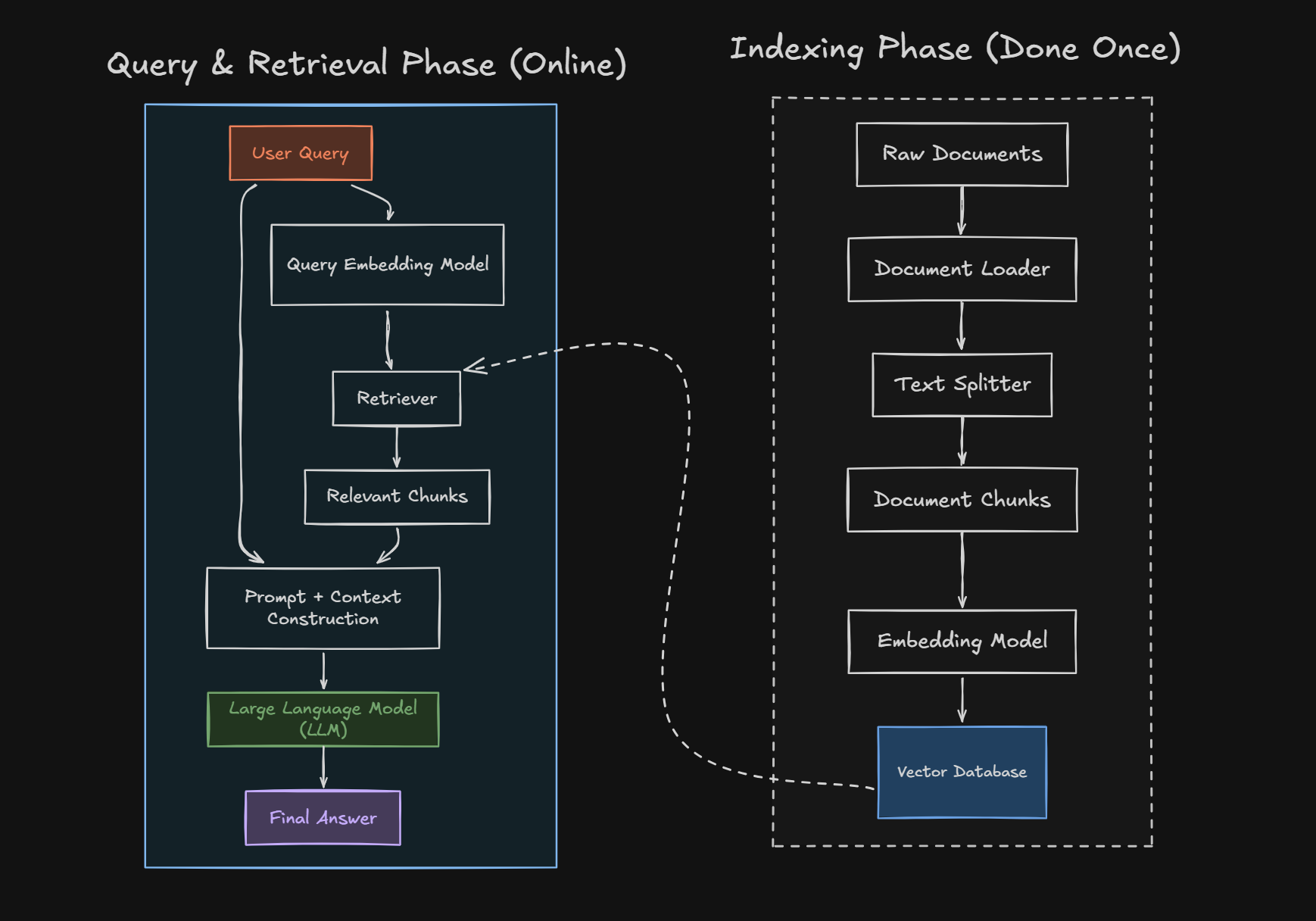
One distinction that makes RAG much easier to understand is that there are really two different phases: indexing and retrieval.
During indexing, documents are loaded, split into chunks, converted into embeddings, and stored in a vector store. This usually happens before a user asks a question.
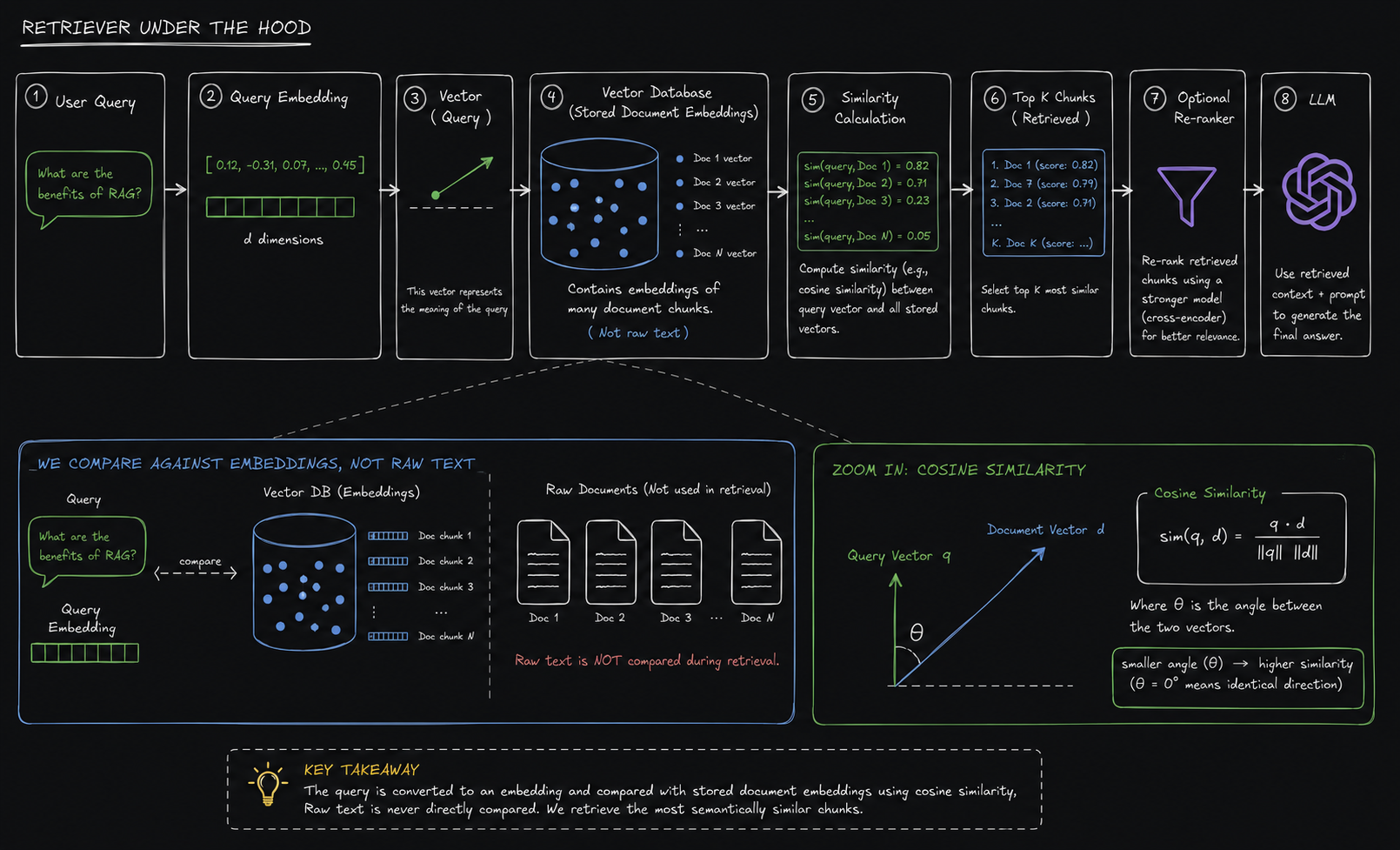
During retrieval, the user's question is converted into an embedding, compared against the stored document embeddings, and the most relevant chunks are returned. Those chunks are then inserted into the prompt given to the LLM.
Part 6: Text Splitting - Probably More Important Than It Looks
You can't simply take a 500-page document and throw the entire thing into the model every time someone asks a question. Apart from context-window and cost limitations, most of the document will be irrelevant to any individual question.
So we split the document into smaller pieces called chunks. But this immediately raises another question: how exactly should we split it?
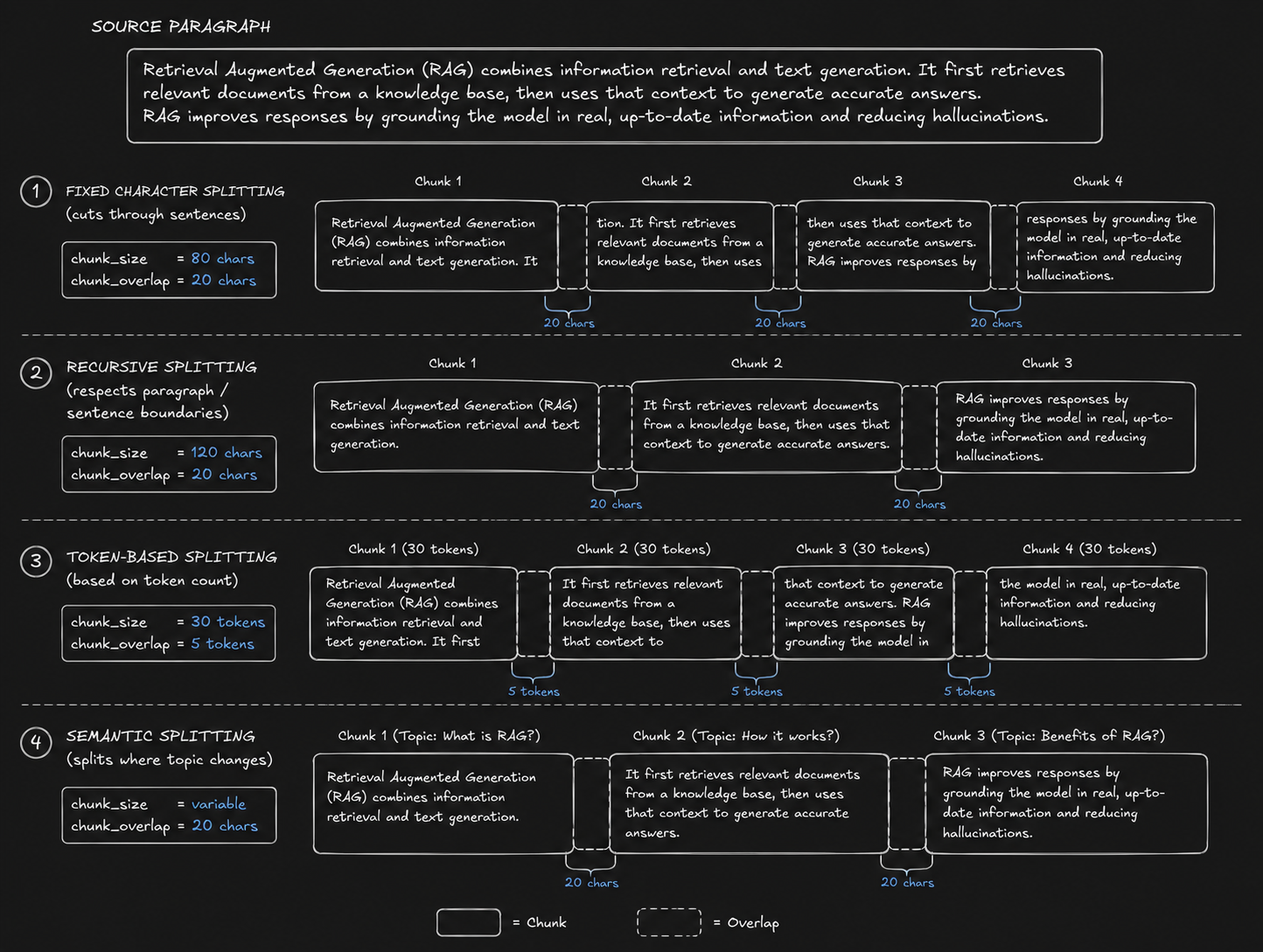
Character-Based Splitting
The simplest approach is to split text after a fixed number of characters. For example, every 1,000 characters becomes a chunk.
It's simple and predictable, but it doesn't understand language. If the 1,000-character boundary happens to fall in the middle of a sentence or paragraph, the resulting chunks can contain incomplete pieces of information.
Recursive Character Splitting
Recursive character splitting is one of the most commonly used approaches because it tries to preserve natural boundaries before falling back to smaller ones.
Instead of blindly cutting after a fixed number of characters, the splitter can first try to split on larger separators such as paragraphs, then sentences, then words, and eventually individual characters if necessary.
The idea is simple: keep meaningful pieces together for as long as possible, and only make the split more aggressive when the chunk is still too large.
Token-Based Splitting
Another approach is to split based on tokens rather than characters. This can be useful because LLMs themselves operate on tokens, so the resulting chunk sizes align more directly with the model's context limits.
The downside is that tokenization isn't always as intuitive to reason about as characters or words. A token is not necessarily a complete word, and different tokenizers can represent the same text differently.
Markdown and HTML Splitting
If the source document has structure, it makes sense to use that structure. Markdown documents have headings, subheadings, lists, and paragraphs. HTML documents have tags and nested sections.
Instead of treating all text as one giant string, structure-aware splitters can preserve that hierarchy. For documentation-heavy applications, this can produce much better chunks because a heading and the content underneath it naturally belong together.
Semantic Splitting
There are also more advanced approaches that try to split text based on changes in semantic meaning rather than simply characters or separators.
The basic idea is that if two consecutive parts of a document are talking about completely different subjects, that may be a better place to create a chunk boundary than an arbitrary character count.
The trade-off is complexity and computation. For many applications, recursive splitting is a perfectly good starting point. More sophisticated approaches become interesting when the structure of the documents makes simple splitting perform poorly.
Chunk Size and Overlap: What Numbers Should I Actually Use?
This was one of the questions I kept coming back to when I started working with RAG. Should I use 100 tokens with 10 tokens of overlap? 500 with 50? 1,000 with 100?
There is no universal answer.
Chunk size is essentially a trade-off between precision and context. Smaller chunks allow the retriever to return very specific pieces of information. But those pieces may not contain enough surrounding context to answer the question. Larger chunks contain more context, but they also contain more irrelevant information and can make retrieval less precise.
Overlap exists because useful information doesn't care about our artificial chunk boundaries. Imagine a paragraph where the first half lands at the end of one chunk and the explanation finishes in the next. With zero overlap, retrieving only one chunk might give the LLM an incomplete thought.
A reasonable overlap helps preserve continuity across those boundaries. But excessive overlap creates duplication. If chunks overlap by almost their entire length, multiple retrieved chunks may contain essentially the same information.
So values like 500 tokens with 50 tokens of overlap should be treated as starting points, not rules. The right configuration depends on the document type, the expected questions, the embedding model, the retrieval strategy, and the context window of the model you're ultimately calling.
The best way to tune this isn't by searching for a magic number online. Create a small evaluation set of questions whose answers you already know, inspect which chunks get retrieved, and adjust your chunking strategy based on actual failures.
Part 7: Embeddings - Turning Meaning Into Numbers
Once the document is split into chunks, we need a way to compare those chunks with a user's question. Keyword matching alone isn't enough because users don't always use the same words as the document.
This is where embeddings come in.
An embedding model converts a piece of text into a vector - essentially a list of numbers representing that text in a high-dimensional space. The goal is that semantically similar pieces of text end up closer together in that space.
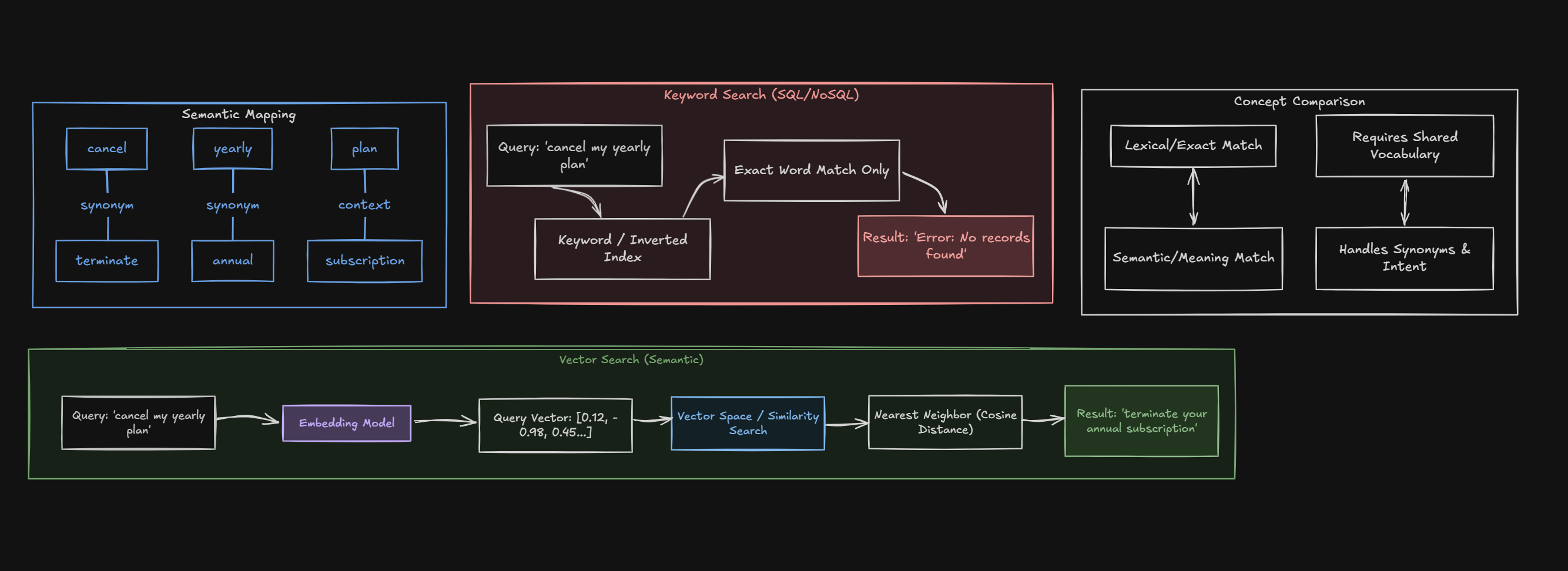
For example, a document might contain the sentence "Annual subscriptions can be cancelled before the renewal date." A user might ask "How do I stop my yearly plan from renewing?" The words aren't identical, but the meanings are related. A good embedding model can capture that relationship.
Part 8: Why a Vector Database? Why Not SQL or MongoDB?
This was another question that made sense once I understood what we were actually searching for.
If I already have MongoDB or PostgreSQL, why can't I just store my document chunks there and search them?
The answer is: you absolutely can, depending on the database and the type of search you need. The important distinction is between traditional structured/keyword queries and vector similarity search.
A traditional SQL query might look for an exact value, filter rows, join tables, or perform a keyword-oriented search. MongoDB is excellent for document-oriented data, filtering, indexing, and querying structured or semi-structured information.
But semantic retrieval gives us a different kind of query. Instead of asking "which documents contain these exact words?", we're asking "which vectors are closest to the vector representing this question?"
Modern databases are increasingly blurring this distinction. PostgreSQL with pgvector, MongoDB with vector search capabilities, and other systems can store both normal application data and embeddings. So "vector database versus SQL" isn't always an either-or decision anymore.
The more useful question is: what kind of search do I need, and what infrastructure already exists in my application?
- Use traditional database queries when you need exact filters, joins, transactions, aggregations, or structured lookups
- Use vector search when semantic similarity is important
- Use hybrid search when you need both lexical and semantic retrieval
- Use a dedicated vector database when vector search is a major part of the application's workload and specialized vector infrastructure provides useful benefits
Part 9: How Does Vector Similarity Actually Work?
Once everything is represented as vectors, we need some way of measuring how similar two vectors are. One of the most common metrics used for embeddings is cosine similarity.
Cosine similarity measures the cosine of the angle between two vectors. In simple terms, we're interested in whether the vectors point in a similar direction rather than simply whether one vector has a larger magnitude than another.
The formula is:
The result generally ranges from -1 to 1, although the values you see in practice for modern text embeddings are often concentrated in a narrower range. A higher cosine similarity means the vectors point in more similar directions.
So if my query embedding is very close to the embedding of a document chunk, that chunk becomes a strong candidate for retrieval.
But We Don't Usually Compare Every Vector Manually
If I have 50 document chunks, brute-force comparison is easy. But real applications can have millions or billions of vectors. Comparing the query against every single vector becomes expensive.
This is where vector indexes and approximate nearest-neighbor algorithms become important. Techniques such as HNSW and other indexing strategies allow vector databases to find highly similar vectors without exhaustively comparing the query against every stored vector.
The important distinction is that the vector database isn't magically understanding the document. The embedding model created the numerical representation. The vector database is primarily helping us store those representations and search them efficiently.
Part 10: How Retrievers Actually Work
A retriever is the component that takes a query and returns the pieces of information that should be passed to the LLM.
For a basic vector retriever, the process looks like this:
- The user asks a question
- The same embedding model used for the documents converts the question into a query vector
- The vector store searches for vectors that are similar to the query vector
- The top K matching chunks are returned
- Those chunks are provided to the LLM as context
- The LLM generates an answer using the retrieved information
This is an important point: the retriever doesn't generate the answer. It retrieves the evidence that the generator should use.
Top K: How Many Chunks Should We Retrieve?
Now another parameter appears: K. If the retriever is supposed to return the most relevant chunks, how many should it return?
Again, there isn't a universal number. A small K gives the model highly focused context but increases the risk of missing an important piece of information. A large K increases recall but also introduces more irrelevant material and consumes more of the model's context window.
This is another reason RAG isn't simply a matter of connecting a vector database to an LLM. Every one of these parameters affects what information ultimately reaches the model.
Similarity Search vs MMR
This was another place where I initially wondered why there needed to be multiple retrieval strategies. If I want the most relevant documents, shouldn't I just take the most similar ones?
That's exactly what similarity search does. It ranks candidates based on how close they are to the query and returns the top results.
The problem is that the top results can sometimes be nearly identical to one another.
Imagine a documentation page contains five paragraphs explaining the same feature in slightly different ways. A similarity search might return all five because all five are highly similar to the question.
MMR, or Maximal Marginal Relevance, adds another consideration: diversity. It tries to select documents that are relevant to the query while also avoiding excessive similarity to the documents that have already been selected.
So the mental model I use is:
- Similarity search asks: "Which chunks are closest to my query?"
- MMR asks: "Which chunks are relevant to my query while also giving me different information?"
Similarity search is often a good default when the answer is likely to be concentrated in a few closely related chunks. MMR becomes more useful when retrieval tends to return many near-duplicates and the answer could benefit from broader coverage.
Neither approach is inherently better. The correct choice depends on the type of questions, the structure of the data, and how repetitive the retrieved chunks tend to be.
Part 11: When RAG Starts Looking Like Hallucination
This is probably the most important practical lesson I got from experimenting with RAG.
I would sometimes ask a question where I knew the answer existed somewhere in the document, but the model would confidently give me the wrong answer. My first thought was: the LLM is hallucinating.
But once I inspected the actual chunks returned by the retriever, I found that the information I needed wasn't even being passed to the model.
The model was being asked to answer a question using context that didn't contain the answer.
This is why debugging RAG requires looking at the entire pipeline. A bad answer could come from the generation model, but it could also come from bad chunking, poor embeddings, an unsuitable retrieval strategy, an inappropriate K value, poor document parsing, or simply a query that doesn't map well to the stored information.
In other words, sometimes what looks like an LLM hallucination is actually a retrieval failure.
Part 12: Putting the Basic RAG Pipeline Together
Once all the individual components make sense, the actual pipeline becomes fairly straightforward.
The code is actually the easy part. The engineering decisions hidden behind those few lines are where most of the interesting problems are: how documents should be split, which embedding model to use, which database or vector store makes sense, how many chunks to retrieve, whether similarity or MMR works better, whether hybrid search is necessary, and how to evaluate retrieval quality.
Part 13: Agents - When a Fixed Chain Isn't Enough
Tools: Giving the LLM a Way to Do Things
Until this point, we've mostly been asking the LLM to generate text. But real applications often need the model to actually do something. Maybe it needs to check the weather, query a database, call an API, perform a calculation, or search through some external system.
That's where tools come in. A tool is essentially a function that the LLM is allowed to call. We describe what the tool does, what inputs it expects, and then make it available to the model.
The important distinction is that the LLM itself isn't executing this Python function. The model decides that the function is useful and generates a tool call with the required arguments. My application then executes the actual function and sends the result back to the model.
This distinction is important because it explains how an LLM can interact with the outside world without actually having direct access to it. The model decides what should happen; the application controls what actually happens.
Once tools make sense, agents become much easier to understand. A tool gives the model an ability. An agent gives the model the ability to decide when and how to use those abilities.
Imagine I give an application three tools: a database query tool, a calculator, and a web search tool. A user asks a question, but I don't know beforehand which of these tools will be required.
With a fixed chain, I would have to define the sequence myself. With an agent, the model can look at the question, decide which tool is appropriate, call it, inspect the result, and then decide what to do next.
The process can look something like this: user question -> LLM decides on a tool -> tool executes -> result goes back to the LLM -> LLM decides whether another tool is required -> repeat until it can answer.
This is the difference I find easiest to remember: a chain follows a workflow that I define, while an agent can dynamically decide the workflow itself.
Of course, that flexibility comes with a trade-off. Agents are harder to predict and debug because the model is now making decisions about what actions to take. For simple, well-defined workflows, a normal chain is often easier to control. Agents become useful when the sequence genuinely needs to be dynamic.
Part 14: What Finally Made LangChain Click for Me
- The LLM is the language and reasoning component, but it doesn't automatically have access to my application's data or tools
- LangChain provides abstractions for connecting the LLM with prompts, workflows, memory, retrieval, tools, and different model providers
- RAG retrieves relevant information at query time instead of requiring the model itself to be retrained every time the underlying data changes
- Text splitting is a retrieval problem, not just a preprocessing step - bad chunks can directly lead to bad answers
- There is no universally correct chunk size or overlap; these values need to be evaluated against the actual data and questions
- Embeddings convert text into vectors so that we can perform semantic rather than purely lexical search
- Vector databases are optimized for similarity search, although modern SQL and document databases can also provide vector-search capabilities
- Cosine similarity is one common way to measure how similarly two embedding vectors are oriented
- Retrievers find evidence; they don't generate the final answer
- Similarity search prioritizes relevance, while MMR adds diversity to reduce repetitive results
- A bad RAG answer can be caused by retrieval failure rather than generation failure
- Chains are useful for predefined workflows, while agents are useful when the sequence of actions needs to be decided dynamically
The biggest mistake I made when I first started learning LangChain was trying to learn the framework before understanding the problems it was solving.
Once the questions became clear, the components stopped looking like random abstractions. Why do I need a text splitter? Because I can't retrieve a useful piece of a 300-page document if I treat the whole document as one giant unit. Why do I need embeddings? Because keyword matching isn't enough when the user's wording differs from the document. Why do I need a vector store? Because now I need to search through those embeddings efficiently. Why do I need a retriever? Because something needs to decide which pieces of information should reach the LLM.
And then there is the part that I think is easiest to underestimate: getting the LLM to answer is not necessarily the difficult part. Getting the right information into the context before the LLM answers can be the real engineering challenge.
That's ultimately what made LangChain make sense to me. It isn't a magic layer that makes an LLM intelligent. It is a collection of abstractions that helps us build the systems around an LLM - and once those systems start involving retrieval, tools, memory, and multiple steps, having those abstractions becomes considerably more useful.
